
Proof of Address
Collect and review address evidence when required.
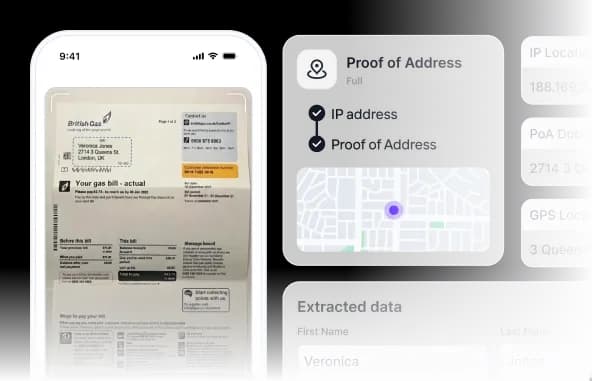
Capture proof-of-address documents, extract configured fields, compare submitted details, and add GPS or IP context where the workflow requires it.
- Part of a guest compliance session
- Hosted, API, and webhooks
- Configured human review
How it works
How document-based address verification works
A guided sequence moves from capture to a clear, reviewable outcome.
Collect the document
The user captures or uploads an eligible proof-of-address document through the configured session.

Extract address data
OCR reads configured name, address, issuer, and date fields from the document.

Apply document rules
The workflow checks document type, recency, required fields, and available consistency indicators.

Compare submitted details
Extracted data is compared with the user-entered or existing verified profile information.

Decide or step up
Matches can pass, while weak evidence or mismatches can retry, move to another method, or enter review.

Proof of address
Replace document chasing with a guided address workflow
Address verification can combine eligible documents with configured location signals, helping teams collect consistent evidence and route mismatches without handling files through email or chat.
Document-based proof
Capture eligible utility bills, bank statements, and other configured proof-of-address documents.
Location context
Collect consented GPS and IP-derived indicators when they are relevant to the workflow.
Configurable matching
Compare extracted information with user-entered or previously verified address data and route discrepancies.
Capabilities
Flexible address evidence
Choose document, GPS, IP, or combined signals according to the use case.
Discuss your workflow- 01Browser capture and upload
- 02Proof-of-address OCR
- 03Recency and required-field rules
- 04Address comparison
- 05GPS and IP context
- 06Manual review routing
Use cases
Where address verification fits
- Long-stay guest onboarding
- Corporate housing stays
- Market-specific guest reporting
- Booking-detail mismatch review
- High-risk reservation review
- Authorized manual review
Security and privacy
Controlled by design, documented in public.
Every module uses the same access, output, audit, and retention boundaries as the wider guest compliance workflow.
Minimum necessary output
Operators receive the approved status and fields rather than unrestricted document copies by default.
Booking-linked history
Configured consent, status, access, and review events remain tied to the relevant session.
Controlled retention
Access and retention rules are configured for the customer's workflow and applicable obligations.
FAQ
Frequently asked questions
Key implementation and workflow questions for proof of address.
Configure your flow
See Proof of Address inside a DocinVault workflow
We will map the module to your customer journey, operating market, and review requirements.