
Watchlist and Sanctions Screening
Screen configured guests against relevant risk sources.
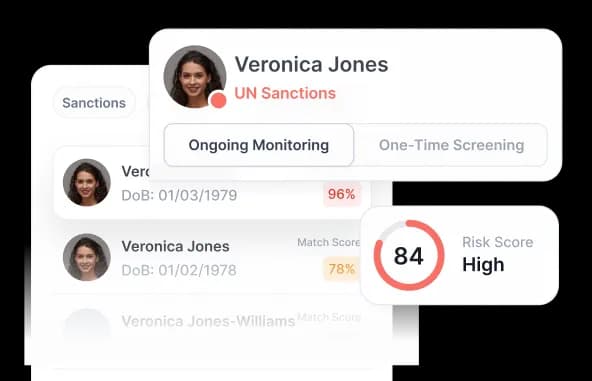
Screen individuals and companies against configured sanctions, PEP, adverse-media, and watchlist sources with tunable scoring and review workflows.
- Part of a guest compliance session
- Hosted, API, and webhooks
- Configured human review
How it works
AML screening in four steps
Connect identity data, scoring, decisions, and monitoring without separating them from the wider KYC flow.
Screen
Check a person or company using verified identity data or approved officer input against configured risk sources.

Score potential matches
Apply the selected scoring method and threshold to the identifiers and supporting attributes available.

Decide
Approve, reject, or route the result to an authorized compliance reviewer according to the customer's process.

Monitor
Run on-demand rechecks or ongoing monitoring and record changes for future investigation and audit needs.

Operating models
Screen continuously or investigate on demand
Run automated screening inside the guest compliance session, then use focused single or batch checks when an authorized team needs to investigate outside the standard flow.

Auto screening
Trigger configured PEP, sanctions, adverse-media, and watchlist checks automatically from verified guest or business data.
Case review
Flag potential matches above the selected threshold and route them to an authorized reviewer with the connected case context.
Delta monitoring
Recheck changed source data over time and keep the resulting alerts, review actions, and outcomes in the audit history.
Scoring
Match scoring you can control
Choose the scoring approach and supporting attributes that fit the screening policy, available data, and review threshold for each workflow.
Logic-v1 (rule-based)
Use deterministic phonetic and fuzzy matching, supported identifiers such as IMO, ISIN, LEI, OGRN, and INN, and penalties when supporting country, date-of-birth, gender, or address data differs.
Name-based and name-qualified
Use Jaro-Winkler and Soundex when only a name is available. Apply name-qualified scoring when date of birth, nationality, registration, or tax identifiers can confirm or weaken a potential match.
Regression-v1 and regression-v2
Evaluate multiple attributes through logistic-regression scoring. Strong scores depend on combined evidence such as name and date of birth, nationality, address, tax details, or an identification number.
Agentic control plane
Automation operates inside defined authority.
The control plane defines what may happen, the execution plane records what happened for this booking, and the evidence plane preserves the resulting audit record.
Control plane
What agents may do
Workflow profiles, schemas, thresholds, permissions, and human-review gates define agent authority.
- Govern
- Map
- Measure
- Manage
Execution plane
What happened for this booking
Configured agents request data, guide retries, run checks, route exceptions, and trigger approved next actions.
- Actions
- States
- Reason codes
- Review gates
Evidence plane
What can be reviewed later
Booking linkage, timestamps, decision history, integrity references, and export manifests form the audit record.
- Audit events
- Hashes
- Retention
- Export manifest
Agents resolve routine gaps within fixed schemas and configured policies. They do not overwrite core identity data or approve policy exceptions without an authorized human decision.
White-label platform
Make the verification experience part of your product
Configure the guest-facing interface, instructions, language, and routing so the session fits the operator or platform experience while DocinVault applies the approved workflow behind it.

Full branding control
Apply the operator or platform logo, approved colors, typography, button styles, and interface details across the guest session without rebuilding the workflow.
Built to fit your stack
Launch through the hosted flow or connect through configured APIs and webhooks. Language, output, and events can be mapped to the systems the customer uses.
Adaptive, guided user experience
Configure document choices, instructions, liveness steps, retry rules, and review routing. Routine cases continue automatically while policy exceptions move to authorized review.
Capabilities
Screening controls for different operating models
Use automated, on-demand, and batch methods with the scoring approach each workflow requires.
Discuss your workflow- 01PEP and sanctions screening
- 02Adverse-media sources
- 03Configurable watchlists
- 04Tunable match thresholds
- 05Batch and one-off screening
- 06Ongoing monitoring alerts
Use cases
Where AML screening fits
- High-risk guest onboarding
- Corporate booking review
- Sanctions and PEP screening
- Periodic guest re-screening
- Platform partner screening
- Authorized manual investigations
Security and privacy
Controlled by design, documented in public.
Every module uses the same access, output, audit, and retention boundaries as the wider guest compliance workflow.
Minimum necessary output
Operators receive the approved status and fields rather than unrestricted document copies by default.
Booking-linked history
Configured consent, status, access, and review events remain tied to the relevant session.
Controlled retention
Access and retention rules are configured for the customer's workflow and applicable obligations.
FAQ
Frequently asked questions
Key implementation and workflow questions for watchlist and sanctions screening.
Configure your flow
See Watchlist and Sanctions Screening inside a DocinVault workflow
We will map the module to your customer journey, operating market, and review requirements.