
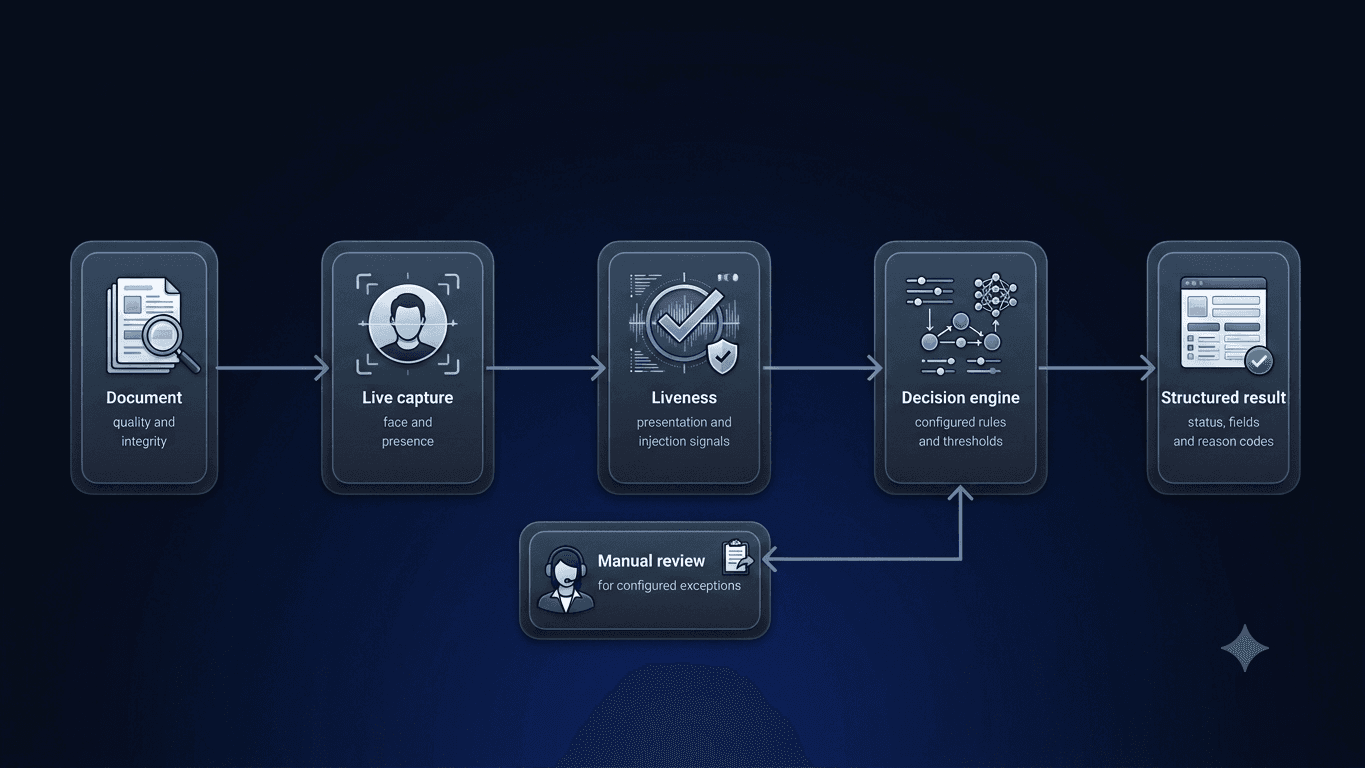
Remote identity verification has a difficult responsibility.
It must determine whether submitted evidence is usable and consistent while also identifying attempts to manipulate the document, impersonate another person, replay previously recorded media, or interfere with the verification process.
No single model, score, or image check can answer all of these questions.
A defensible workflow can combine document assessment, biometric binding, liveness detection, presentation-attack controls, capture-path protections, application security, and manual review.
Remote verification faces several different attack types
An attacker may attempt to:
- Upload an altered document
- Display a document on another screen
- Print and re-photograph an identity document
- Replace a portrait
- Modify a date or document number
- Submit inconsistent front and back images
- Use a photograph instead of a live person
- Replay a video
- Present a mask
- Inject pre-recorded or generated biometric data into the process
- Exploit an application or API weakness
These attacks do not all target the same layer.
A document check cannot prove that a live person is present. A liveness check cannot confirm that every printed field is genuine. A biometric laboratory result cannot determine whether an API has an authorization vulnerability.
Meaningful assurance therefore requires multiple controls.
Document assessment begins with evidence quality
Before document information can be assessed, the evidence must be usable.
DocinVault can evaluate:
- Blur
- Sharpness
- Lighting
- Reflection
- Cropping
- Missing sides
- Document position
- Capture suitability
Unusable evidence can be rejected with clear retry guidance. This improves security and completion because the guest knows what must be corrected instead of receiving an unexplained failure.
Document integrity uses multiple signals
Depending on the document and configured workflow, DocinVault can combine:
- Template consistency
- Font and typographic comparison
- MRZ checksum validation
- Visible-field consistency
- Front and back consistency
- Expiry assessment
- Document security signals
- NFC-derived information
- Chip or electronic-seal integrity
- Manipulated-photo detection
- Screen-presentation detection
The Issuing Countries catalog explains that no single document signal is treated as universally conclusive. The measures used depend on the document, issuing market, capture method, and customer risk policy.
Facial similarity and liveness answer separate questions
Facial similarity
Facial similarity asks whether the person completing the verification resembles the portrait associated with the identity document.
Liveness
Liveness asks whether biometric evidence is being captured from a live person present during the session.
A system may use active or passive methods depending on the configured flow.
DocinVault can use facial similarity, active or passive liveness, dynamic selfie methods, and manual review. Its practice statement also describes detection approaches associated with flat surfaces, gaze, 3D masks, silicone masks, paper images, and screen presentations.
Presentation-attack evaluation needs a defined scope
Presentation attacks use artifacts such as printed photographs, screen replays, or masks in front of the intended camera or sensor.
When a provider presents test evidence, the report should identify the biometric component, version, capture method, attack instruments, conditions, date, and decision thresholds in scope.
A result for one component should not be interpreted as:
- A guarantee that every possible spoof will be detected
- An assessment of the entire platform
- A complete application security assessment
- Proof that every customer configuration performs identically
- A replacement for operational monitoring or manual review
Injection resistance is a separate problem
Presentation attacks attempt to fool the capture process through artifacts presented to the camera or sensor.
Injection attacks attempt to insert manipulated or pre-recorded data into the processing path rather than presenting it naturally through the intended capture flow.
The controls and tests for these attack paths answer different questions and should therefore be scoped and reported separately.
Buyers should ask how the service protects the intended capture path, session binding, upload rules, replay handling, device signals, and server-side decision process without assuming that any system is spoof-proof.
Application and API security cover another layer
Biometric controls do not replace application and API security testing.
Identity platforms also need to protect:
- Session creation
- Authorization
- Account roles
- API endpoints
- Webhook delivery
- Evidence access
- Administrative interfaces
- Cloud configuration
- Data export
- Integration secrets
A useful technical review combines manual application and API testing with a documented scope, severity model, remediation record, and retest of significant findings.
Providers should be able to explain secure development controls, vulnerability handling, finding severity, remediation expectations, and release restrictions for unresolved critical weaknesses.
Manual review remains important
Automated verification should not force every case into a simple yes or no result.
A low-confidence or inconsistent case may need:
- Another capture attempt
- A different document
- Human review
- A live video check
- Additional evidence
- A customer-defined exception process
DocinVault can return statuses such as approved, rejected, pending, or needs review.
The customer determines:
- Accepted evidence
- Similarity thresholds
- Retry count
- Manual-review range
- Decision rules
- Operational consequence
This is especially important in hospitality, where a failed automated check can affect a real guest arriving at a property.
Layered assurance is more useful than one perfect score
Remote identity verification is strongest when the system combines several forms of evidence.
A reliable workflow may include:
- Capture-quality checks
- Document consistency checks
- MRZ or NFC evaluation
- Facial comparison
- Liveness assessment
- Presentation-attack controls
- Application and API protections
- Manual review
- Audit history
- Customer-defined decision rules
The result is not simply a claim that a document looks real. It is a structured outcome supported by the checks, evidence, thresholds, and review process configured for that workflow.
Frequently asked questions
Clear distinctions between document, biometric, injection, and application-security testing.
Continue the conversation
Review the verification controls available for your workflow
Contact the DocinVault team to discuss document checks, biometric configuration, manual-review paths, and integration requirements.
contact@docinvault.com