
Identity Document Verification
Verify identity documents with guided capture and configurable checks.
Verify a person using a government-issued identity document, structured document data, and configurable biometric or authoritative checks.
- Part of a guest compliance session
- Hosted, API, and webhooks
- Configured human review
How it works
How ID verification works
Configure the checks each workflow needs while keeping the user journey clear.
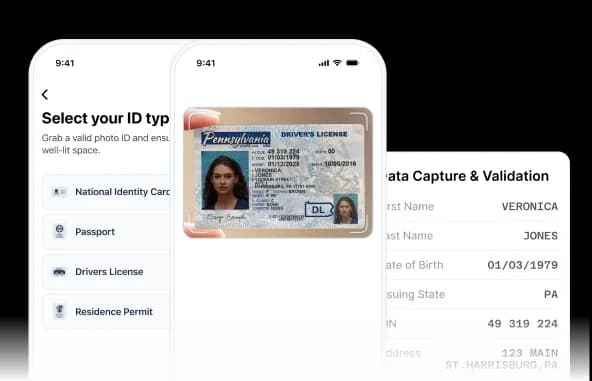
Capture the document
The user captures or uploads an eligible passport, national identity card, driving licence, or other supported document.

Extract key data
DocinVault reads configured fields through OCR, visual-zone, MRZ, barcode, or supported chip processing.

Validate data integrity
The workflow compares available document zones, sides, formats, checksums, and logical field relationships.

Check for fraud signals
Configured checks surface evidence of screen capture, photocopying, tampering, template mismatch, or other anomalies.

Decide and route
Your rules return a result or route the session to a stronger check or an approved reviewer.

Why it matters
Connect document capture to a clear verification decision
A document image alone does not establish identity. DocinVault combines capture, extraction, integrity checks, fraud signals, and configurable step-up paths in one workflow.
Structured document data
Extract configured identity fields from visual zones, MRZ data, barcodes, and supported chip data.
Document integrity checks
Compare document zones and surface format, consistency, template, or capture anomalies for decisioning.
Risk-based next steps
Approve, reject, request another capture, or route the session to liveness, Face Match, Video KYC, or review.
Agentic control plane
Automation operates inside defined authority.
The control plane defines what may happen, the execution plane records what happened for this booking, and the evidence plane preserves the resulting audit record.
Control plane
What agents may do
Workflow profiles, schemas, thresholds, permissions, and human-review gates define agent authority.
- Govern
- Map
- Measure
- Manage
Execution plane
What happened for this booking
Configured agents request data, guide retries, run checks, route exceptions, and trigger approved next actions.
- Actions
- States
- Reason codes
- Review gates
Evidence plane
What can be reviewed later
Booking linkage, timestamps, decision history, integrity references, and export manifests form the audit record.
- Audit events
- Hashes
- Retention
- Export manifest
Agents resolve routine gaps within fixed schemas and configured policies. They do not overwrite core identity data or approve policy exceptions without an authorized human decision.
Fraud prevention
Built-in fraud detection
Catch spoofing, tampering, and counterfeit documents with DocinVault's advanced fraud prevention and detection technologies.

Document liveness and enhanced security
- Screen detection
- Photocopy detection
- Edge detection
- Physical ID detection through scene segmentation
- Multiple IDs with the same background detection

Advanced data integrity and validation
- Consistency across MRZ, VIZ, barcode, and chip data
- Data-format checks, including MM/DD/YYYY
- Data-logic checks, including MRZ checksum verification
- Consistency across front, back, and additional document sides
- Cross-checking with selected issuer registries and eIDV databases

Portrait and document tampering analysis
- Analog and digital face-photo tampering detection
- Visual-marker analysis, including holograms and watermarks
- Ghost-photo matching analysis
- Template matching
- RGBA channel analysis
- Font-consistency analysis
Capabilities
Document security and workflow controls
Use only the modules required for the customer, market, and risk level.
Discuss your workflow- 01Live capture and upload
- 02MRZ and barcode processing
- 03Front and back consistency
- 04Template and visual-marker analysis
- 05Configurable step-up checks
- 06API, hosted, and webhook delivery
Use cases
Where ID verification fits
- Pre-arrival guest verification
- Remote and self check-in
- Digital access release
- Guest identity rechecks
- Platform host and partner checks
- Exception and dispute evidence
Security and privacy
Controlled by design, documented in public.
Every module uses the same access, output, audit, and retention boundaries as the wider guest compliance workflow.
Minimum necessary output
Operators receive the approved status and fields rather than unrestricted document copies by default.
Booking-linked history
Configured consent, status, access, and review events remain tied to the relevant session.
Controlled retention
Access and retention rules are configured for the customer's workflow and applicable obligations.
FAQ
Frequently asked questions
Key implementation and workflow questions for identity document verification.
Configure your flow
See Identity Document Verification inside a DocinVault workflow
We will map the module to your customer journey, operating market, and review requirements.